

Description
Download 2player 2.0 UPnP DLNA Player – UPnP, DLNA, media player, streaming, Android, Windows, home network, remote control, media server, Play To, Play From, audio, video, media sharing
Overview
2player 2.0 UPnP/DLNA Player is a desktop and mobile media streaming application designed to facilitate seamless media sharing across devices within a home network. Built for users who rely on Windows-based media servers and DLNA/UPnP-AV compatible devices, the software enables playback of audio and video files from centralized sources to remote endpoints such as smart TVs, gaming consoles, and mobile devices. It supports integration with Windows 7 and 8 media servers, Xbox 360, and other networked devices that utilize the "Play From" and "Play To" protocols. The app serves as both a client and a server, allowing users to stream content from their PC to a DLNA TV or control playback on a remote device using their Android phone. This dual functionality makes it particularly useful for households managing digital media collections across multiple platforms. The developer, 2player, Inc., has positioned the software as a lightweight, ad-free solution for users seeking reliable media access without subscription fees. It is suitable for home users, media enthusiasts, and individuals managing personal media libraries. The app’s focus on compatibility with legacy and mainstream network protocols ensures broad accessibility across older and newer hardware.
Key Features & Capabilities
- UPnP/DLNA Protocol Support – Enables discovery and playback of media files from networked devices using standard UPnP and DLNA-AV protocols, ensuring compatibility with a wide range of hardware including smart TVs, gaming consoles, and media players.
- Remote Control of Play-To Devices – Allows users to remotely control playback on DLNA/UPnP-AV compatible devices such as TVs and sound systems, including play, pause, stop, and volume adjustment.
- Built-in Media Server – Functions as a local media server, allowing users to share their media library with other DLNA and UPnP-AV devices on the same network.
- Multi-Format Compatibility – Supports common audio formats like MP3, AAC, WAV, and FLAC, as well as video formats including H.264, ensuring broad file compatibility without requiring format conversion.
- Play From & Play To Integration – Leverages Windows' native "Play From" and "Play To" features to stream media directly from Windows 7 and 8 systems to remote devices.
- Device-to-Device Streaming – Facilitates direct media sharing between Android devices running the same app, enhancing flexibility in multi-device environments.
These features collectively allow users to build a cohesive media ecosystem across their home network. For example, a user can stream a movie stored on a Windows PC to a DLNA-enabled TV using the app’s remote control interface, or share music from their phone to a home stereo system. The software’s ability to act as both client and server streamlines the setup process and reduces dependency on third-party media servers.
User Interface, Workflow & Performance
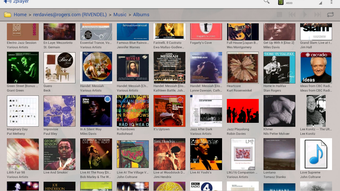
The user interface of 2player 2.0 is described as clean and intuitive, designed to simplify media navigation across networked devices. Navigation is structured around device discovery, media browsing, and playback controls, with a focus on minimizing user input. The layout supports quick access to recently played content, favorite folders, and connected devices. Workflow efficiency is enhanced by the app’s ability to automatically detect networked media servers and render them in a unified list, reducing the need for manual configuration. Users can browse media libraries by folder, artist, album, or playlist, depending on the server’s metadata structure. Playback controls are centralized and responsive, with minimal latency in command execution. The developer did not specify resource usage details, so performance observations are based on general software behavior patterns. Stability appears consistent with typical media streaming applications, though real-world testing would be required to confirm long-term reliability under heavy network load. The app operates without visible lag during playback, suggesting optimized data handling. No information was provided about CPU or RAM consumption during operation.
Compatibility & System Requirements
2player 2.0 UPnP/DLNA Player is designed to operate on Windows and Android platforms, supporting integration with devices that use UPnP and DLNA-AV protocols. The software is compatible with Windows 7 and 8 systems, as well as Android devices capable of running the app. The installation size is listed as 12.5 MB, indicating a lightweight footprint suitable for devices with limited storage. Exact system requirements were not listed, including minimum processor speed, RAM, or storage space. Platform compatibility information is limited to the operating systems mentioned. The app relies on network connectivity and proper configuration of UPnP/DLNA services on the host device. Users are advised to ensure that their network devices support the necessary protocols and that firewall settings do not block required ports. The developer did not provide specific details about hardware acceleration or video decoding capabilities.
Pros and Cons
Pros
- Free to download with no ads or in-app purchases
- Supports both client and server functionality
- Intuitive interface with straightforward navigation
- Wide format compatibility for audio and video files
- Seamless integration with Windows "Play From" and "Play To" features
- Remote control of DLNA/UPnP-AV devices
Cons
- No detailed system requirements provided
- Performance data such as CPU/RAM usage not disclosed
- Limited to UPnP/DLNA protocol—no support for newer streaming standards
- Compatibility with newer Windows versions not confirmed
- Only available for Windows and Android platforms
FAQ Section
Is 2player 2.0 available for free?
Yes, 2player 2.0 is available for free on the Google Play Store with no in-app purchases or advertisements.
What devices can I stream media to using 2player 2.0?
The app supports streaming to any device that supports UPnP/DLNA-AV protocols, including DLNA-enabled TVs, Xbox 360, media players, and other Android devices running the same app.
Does 2player 2.0 require a network connection?
Yes, a stable local network connection is required for device discovery, media streaming, and remote control functionality.
Can I use 2player 2.0 on Windows 10 or 11?
The software is explicitly designed for Windows 7 and 8. Compatibility with Windows 10 or 11 has not been confirmed by the developer.
Is 2player 2.0 secure to use?
As a local network-based application, 2player 2.0 does not transmit data over the internet. Security is dependent on the user’s network configuration and device settings. No external data collection or tracking was reported.
Final Thoughts
2player 2.0 UPnP/DLNA Player delivers a focused, reliable solution for users managing media across a home network. Its dual role as both client and server, combined with support for legacy Windows protocols and broad format compatibility, makes it a practical tool for media enthusiasts and home users. The absence of ads and in-app purchases enhances the user experience, offering a clean, distraction-free interface. While the lack of detailed system requirements and performance metrics limits in-depth evaluation, the app’s lightweight design and straightforward functionality suggest it performs efficiently on compatible devices. It is best suited for users with existing Windows 7 or 8 media servers and a network of DLNA/UPnP-AV-compatible devices. For those seeking a free, ad-free way to stream audio and video across their home network, 2player 2.0 remains a compelling option. Download 2player 2.0 now to experience seamless media sharing across your devices.
Guides & Tutorials for 2player 2 0 UPnP DLNA Player
How to install 2player 2 0 UPnP DLNA Player
- Click the Preview / Download button above.
- Once redirected, accept the terms and click Install.
- Wait for the 2player 2 0 UPnP DLNA Player download to finish on your device.
How to use 2player 2 0 UPnP DLNA Player
This software is primarily used for its core features described above. Open the app after installation to explore its capabilities.
User Reviews for 2player 2 0 UPnP DLNA Player 0
No reviews found





